


.svg)

contact@blackcoffeerobotics.com

India, USA
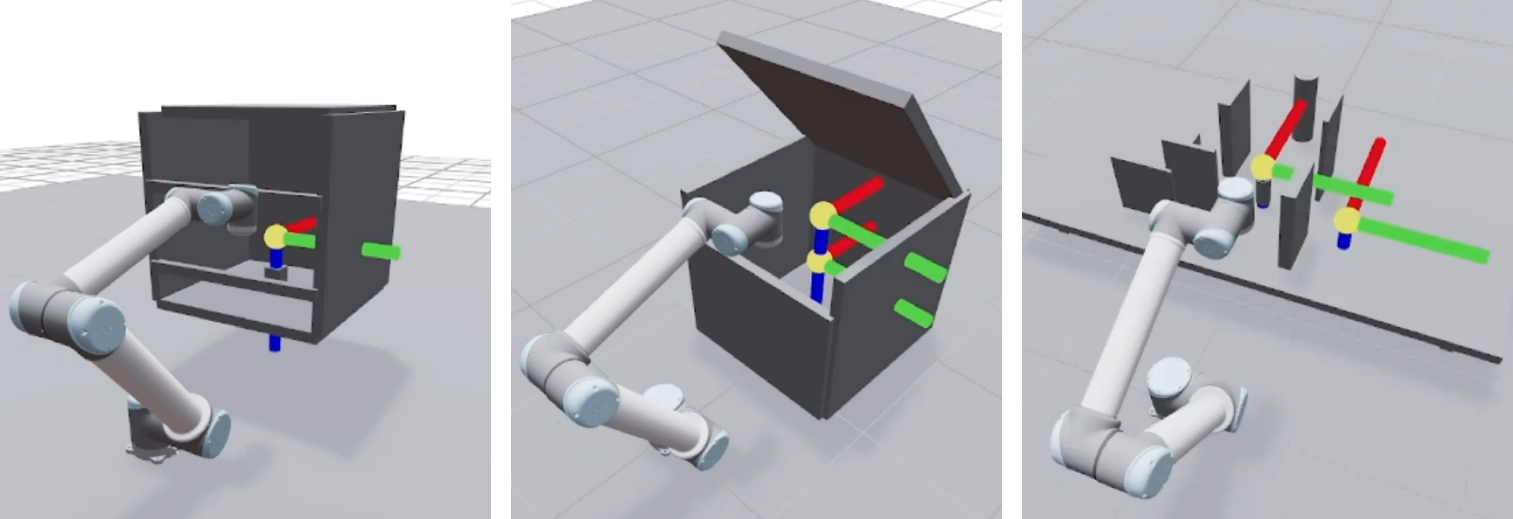
We benchmarked the MoveIt2 planner families recently and the conclusion was uncomfortable. OMPL is complete but non-deterministic and slow under constraints, trajectory optimizers are smooth but fragile without a good seed, and none of them is production-grade without a layer of engineering around it. RRT* consumed its entire planning budget in every scene. The natural question is what changes when the planner stops being CPU-bound.
cuRobo is NVIDIA's answer: a CUDA-accelerated library that solves inverse kinematics, geometric planning, and trajectory optimization as batched GPU work rather than sequential CPU search. Instead of growing one tree or refining one initial guess, it evaluates many seeds in parallel and keeps the best converged result. That is why a bad seed costs it nothing and costs a CPU optimizer the whole query. This article covers what the rewrite changed, how you get it onto ROS2, and how it measures up.
V2 is a rewrite rather than a version bump, and three things matter for anyone already using it.
The API is new and the old one does not carry forward: Motion planning moved to a redesigned planner interface with first-class batch planning, goals are expressed through tool-frame abstractions, and the internals were restructured around composition instead of class hierarchies. Code written against V1 will not run. Teams that need the old behavior pin to the last V1 release. The documentation is the reference here.
Perception was rebuilt: V2 adds a block-sparse TSDF mapper with ESDF extraction and multi-camera fusion, feeding voxel output directly into collision checking. Depth-camera obstacle avoidance is now a first-class path rather than something you assemble.
The license changed: V2 is Apache-2.0. V1 was not, and that difference decides more deployments than any feature below.
Both versions represent the robot as a set of collision spheres rather than meshes, which is what makes whole-body collision checking cheap enough to run thousands of times in parallel.
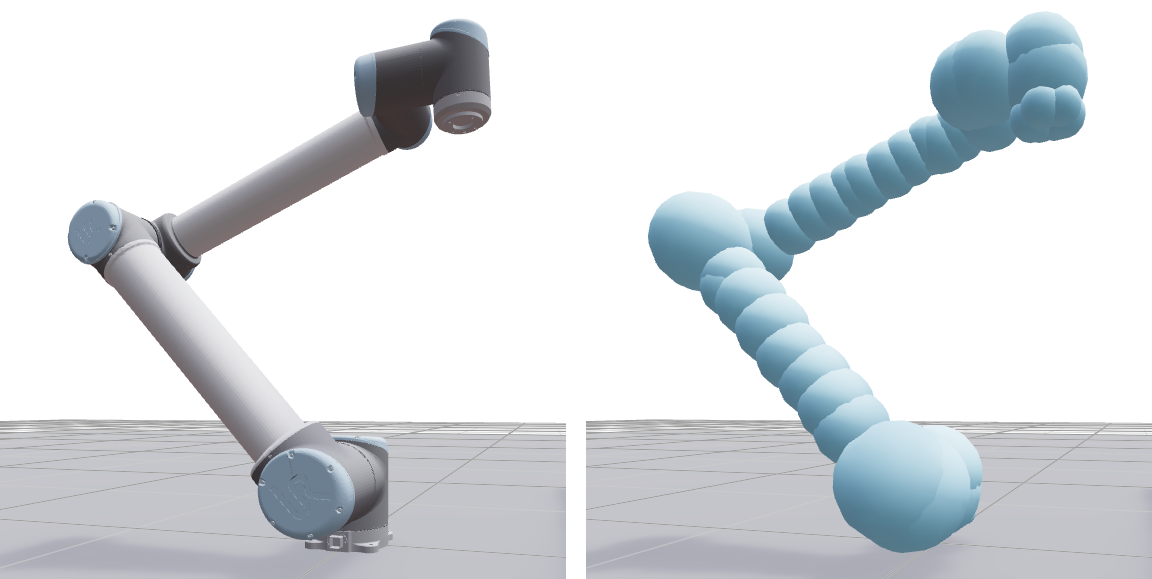
cuRobo is a Python library. Isaac ROS cuMotion is the NVIDIA package that brings it to ROS2, and it registers as a genuine MoveIt2 planner plugin, selectable from the RViz Planning Library dropdown and drop-in for a harness already built around MoveIt. Standing it up took about ten lines of launch configuration and no planner-specific code.
The catch is what each layer is licensed under, and it runs opposite to the convenience. The following is a reading of the license terms as published; it is not legal advice, and anything heading for a customer deployment needs your own counsel's review.
The version that works with the MoveIt2 plugin is the one you cannot ship, and the version you can ship is the one the plugin does not use, because cuMotion currently bundles V1. That leaves three paths: cuMotion for evaluation and benchmarking, NVIDIA's newer closed binaries under the Isaac ROS license, or driving cuRobo V2 directly behind your own thin ROS2 layer, which is the only route that leaves your code under Apache-2.0.
We ran all four planners over 10 runs on identical scenes and queries (a table pick-and-place sequence, a box scene with easy and hard goals, and a cage scene with tight surrounding obstacles) on a UR10, with a 10s budget for the OMPL planners.
Success rate by query for RRTConnect, RRT*, cuMotion and cuRobo V2, with mean planning time labelled on each bar
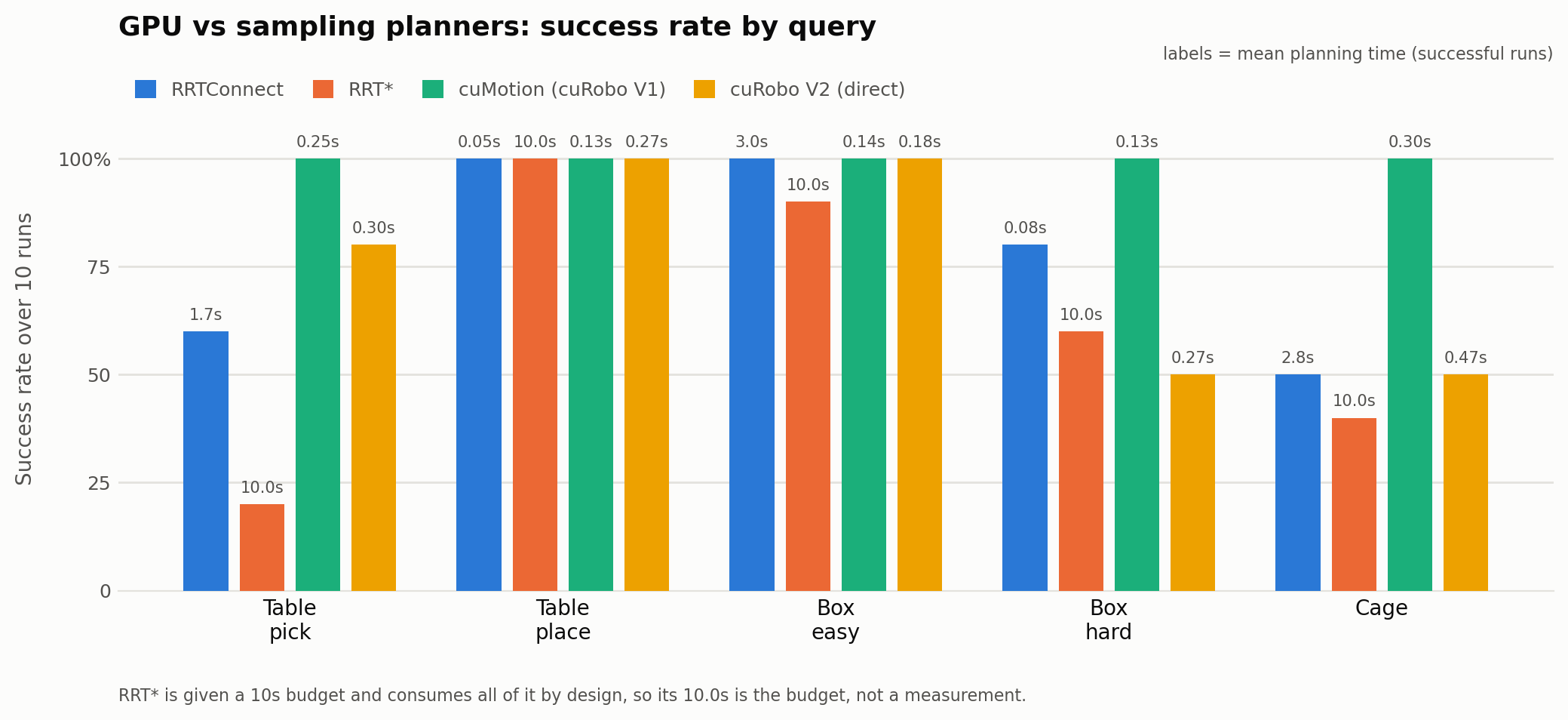
10 runs per scene; table and box report 20 phases each. OMPL under a 10s budget. Averages over successful runs only. GeForce RTX 3060 12GB, ROS2 Humble. Both cuRobo configurations run out of the box: cuMotion with NVIDIA's shipped tuning, V2 at library defaults. Tuning can move these numbers substantially.
The cage scene is the clearest result: The sampling planners solved it half the time or less, burning seconds and producing joint paths over 10 rad. cuMotion solved it every time in 0.301s at 4.24 rad, a third of the joint travel and roughly 9x faster than RRTConnect. Heavy clutter is where sampling degenerates and parallel seeding still finds a corridor.
Predictability separates them more than raw speed: RRTConnect ranged from 0.03s to a full 10s timeout on the same query; cuMotion held a tight band across every repeat. A planner you can put in a cycle-time budget is worth more than one that is occasionally faster.
Out of the box, V2 driven directly did not match cuMotion: It was less reliable and roughly 55% slower on every scene. That gap is tuning, not capability: cuMotion ships NVIDIA's tuned configuration while a fresh V2 harness starts from defaults, and the tuning does not transfer. Transplanting V1's seed counts onto the V2 solver made things worse, not better. Read these as the floor for the direct path, not its ceiling.
Collision spheres need tuning, especially in tight spaces: The sphere approximation is what makes GPU collision checking fast, and it is also the main thing you tune. Too coarse and the planner clips obstacles or refuses valid configurations near clutter; too fine and every evaluation costs more compute. In the cage scene that tradeoff is the difference between a plan and a failure, and getting it right on an arm that does not ship with a config is real work.
GPU memory bounds scene complexity, and determinism is not guaranteed: Obstacle count, voxel resolution, and batch size compete for the same VRAM, and the ceiling appears under exactly the cluttered conditions you deployed GPU planning to handle. Results also depend on the GPU: a trajectory validated on a workstation is not automatically what the embedded board produces in the cell.
There is no first-class MoveIt2 integration: The cuMotion plugin presents as a MoveIt planner but forwards the request to a separate GPU node, so most of what MoveIt was configured to do, including its kinematics, collision checking, joint limits, and time parameterization, is replaced by cuRobo's own. Your MoveIt configuration quietly stops being the source of truth, and you maintain the robot description twice. Combined with the licensing, teams heading for production should budget a genuine migration onto cuRobo V2 directly rather than expecting a drop-in.
GPU motion planning earns its place in heavy clutter, tight cycle times, and workloads where a multi-second planning budget does not exist. Our numbers say it clears queries that sampling planners solve half the time, and it does so predictably enough to schedule. What they also say is that neither the licensing nor the integration is a drop-in, and the version you can ship commercially is the one that needs the most work to stand up.
Getting from a planner that benchmarks well to a cell that runs reliably is the work: collision tuning, world representation, velocity scaling matched to the hardware, and independent safety. That is what we do at Black Coffee Robotics. We build production-ready robotics applications and deploy them in the real world. If you are weighing GPU motion planning against a CPU stack you have already outgrown, reach out to us.

.webp)
contact@blackcoffeerobotics.com
India, USA